
Weather
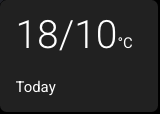
A weather card displays weather information from a Home Assistant weather entity. It can show the current condition, such as Sunny, Cloudy, or Rainy, the high / low temperatures for today or tomorrow, such as 18/10°C, or a daily forecast for the coming days.
Weather cards are read-only — tapping them does nothing.
Setting Up a Weather Card
- Select a card and change its type to Weather.
- Enter a Weather Entity — the Home Assistant weather entity ID you want to display, for example
weather.forecast_home. - Choose Display:
- Current Conditions shows the live weather condition icon and label.
- Temperatures Today shows today's high / low temperature.
- Temperatures Tomorrow shows tomorrow's high / low temperature.
- Daily Forecast shows the current conditions and temperature with today's high / low, followed by the coming days. See Daily Forecast.
- For temperature displays, optionally enter a Label to override the default card label.
- On a Large card, turn on Large Temperature Numbers if you want the high / low reading scaled much larger.
How It Works on the Panel
- In Current Conditions mode, the card watches the weather entity's current state.
- In Current Conditions mode, the icon uses the normalized weather condition, while the label keeps provider-specific text from Home Assistant (for example,
light rainis shown as Light Rain rather than being reduced to Rainy). - In Temperatures Today and Temperatures Tomorrow modes, the card asks Home Assistant for the daily forecast for the configured weather entity.
- In temperature modes, the unit label comes from the panel's Temperature Unit setting.
- In temperature modes, the card label defaults to Today or Tomorrow, unless you set your own label.
- If Home Assistant reports
unknown,unavailable, or an unexpected current condition, the card shows a fallback weather icon and a readable label. - If the requested forecast is missing or unavailable, the card shows --/-- instead of leaving the card blank.
- The card uses the fixed tertiary background colour, like Sensor, Date, Clock, and World Clock cards.
Home Assistant actions permission
The temperature and Daily Forecast displays need the same Allow the device to perform Home Assistant actions setting as control cards. Basalt uses that permission to request forecast data from Home Assistant.
Temperatures Tomorrow
To show tomorrow's forecast high and low, create a Weather card and set Display to Temperatures Tomorrow. Enable Home Assistant actions so the panel can request the forecast.
Older configurations containing a separate Weather Forecast card load as a Weather card with this setting. You do not need to recreate them.
Daily Forecast
Daily Forecast is designed for wide cards. The left side shows the current condition icon, the current temperature, the condition name, and today's high / low. The rest of the card shows one column per day, each with the day name, a condition icon, and the high / low.
The number of days follows the card width:
| Card size | Days shown |
|---|---|
| Single, Tall, or Extra Tall | Current conditions only |
| Wide or Large | 2 |
| Extra Wide | 4 |
| Ultra Wide | 6 |
- The current conditions and temperature update as soon as Home Assistant reports a change. The daily forecast is requested when the panel connects and then every hour.
- Day names follow the panel language, and temperatures follow the panel's Temperature Unit setting.
- Up to four Daily Forecast cards can be used at once. Any others show the current conditions only.
- Daily Forecast is not available on the 4-inch ESP32-S3 panel, which also has no temperature forecast displays.
Supported Conditions
| Home Assistant state | What the card shows |
|---|---|
sunny | Sunny |
clear-night | Clear night |
partlycloudy | Partly cloudy |
cloudy | Cloudy |
fog | Fog |
hail | Hail |
lightning | Lightning |
lightning-rainy | Lightning and rain |
pouring | Pouring |
rainy | Rainy |
snowy | Snowy |
snowy-rainy | Snowy and rain |
windy | Windy |
windy-variant | Windy and cloudy |
exceptional | Exceptional |
unknown | Unknown |
unavailable | Unavailable |